


futuredevice
Whisper Key
Whisper Key
Voice input needs a compatible speech-to-text setup. Keyboard connectivity alone does not provide transcription. Tell us your operating system and dictation app if you need help checking compatibility.
Check my setupShipping (USD): US Standard $15 below the free-shipping threshold; free on US orders over $70 after discounts. International tracked shipping $10 to supported destinations. Shipping details. Your address-specific total is shown at checkout before payment.
Tracked shipping · 30-day returns · Delivery estimates in our shipping policy
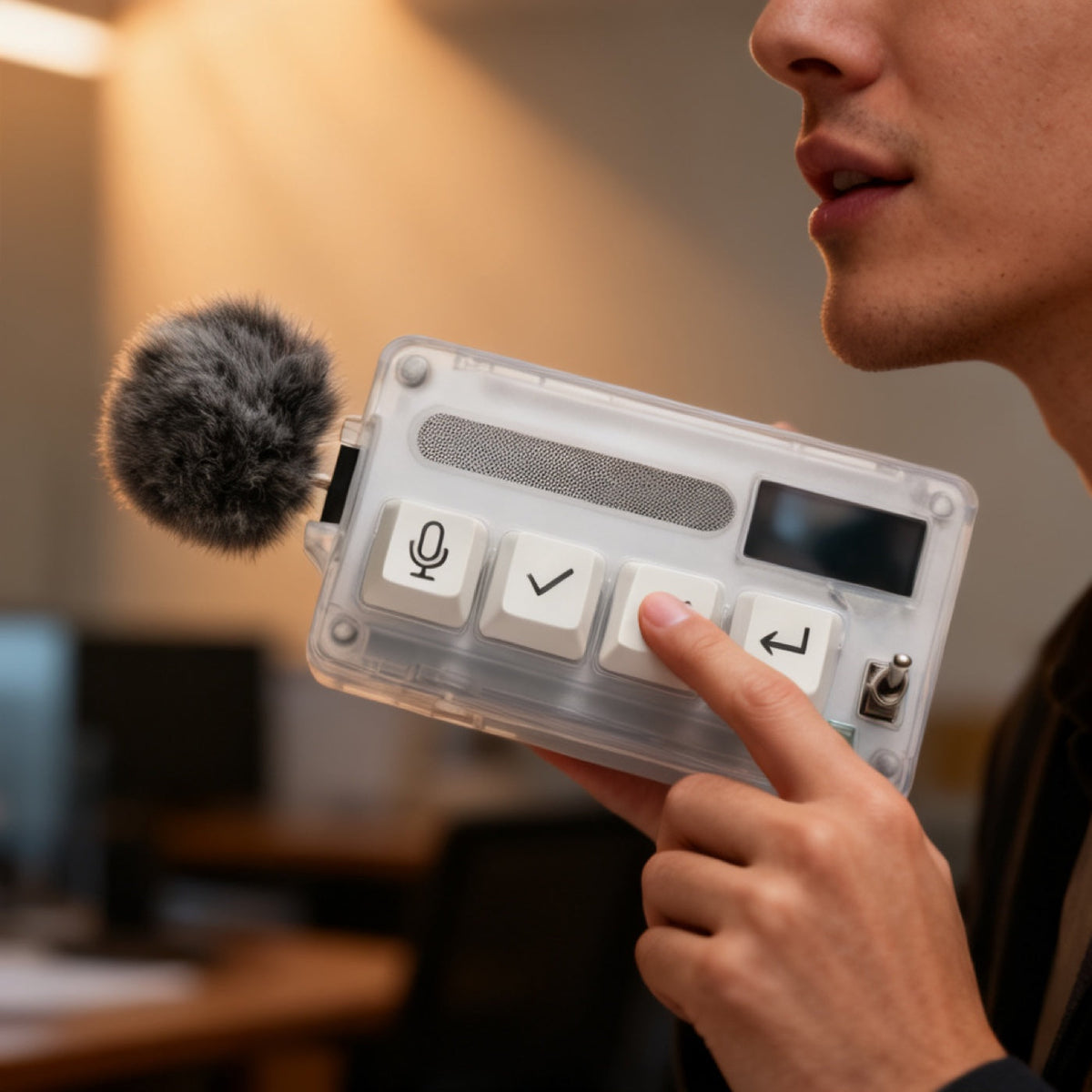
Voice input in a handheld form. Whisper Key combines a microphone, four labelled keys and an input-level display in a body you can bring into position for a spoken draft. Pair the hardware with compatible speech-to-text software and choose the placement that suits your workflow.
What is the Whisper Key?
A clear polycarbonate body you can see the whole circuit board through. A grey fur windscreen sits on a short stalk at the left edge beside a mesh microphone slot. Four keycaps run in a row, microphone, accept, reject, enter, with a small OLED window to their right and a metal toggle switch below it.
What is the Whisper Key for?
Use Whisper Key as part of a configured dictation setup for drafting prompts and other text. Its handheld form lets you bring the microphone into position when you want to speak, then set it down between drafts. Check recognition with your voice, room and chosen app before relying on the workflow.
How do you use the Whisper Key?
- Pair the Whisper Key over Bluetooth, then configure it with a compatible dictation app. Keyboard pairing and speech transcription are separate setup steps.
- Configure the microphone key using the controls supported by your dictation app. The listed OLED input-level window shows audio level; it does not confirm that speech has been transcribed correctly.
- Start and stop dictation using the assignments supported by your setup. Confirm where the app inserts text, then review the draft before sending it.
- Check and configure the accept, reject and enter key assignments for your intended application. Keep reviewing prompts, proposed changes and commands before approving them.
Whisper Key specifications
| Keys | 4: microphone (push-to-talk), accept, reject, enter |
|---|---|
| Display | Monochrome OLED input-level window |
| Connection | Bluetooth; enumerates as a standard HID keyboard |
| Controls | Hardware toggle switch |
| Body | Transparent polycarbonate, internals visible |
| Microphone | Mesh slot plus removable fur windscreen |
| Speech level | About 20 dB, per the manufacturer |
| SKU | FD-07 |
How does the Whisper Key compare?
Compare the handheld placement of Whisper Key with the desk-based Voice Pad. Think about where you want the microphone during a draft and where the device will rest between prompts. Check each product’s connection and software requirements; form factor alone does not establish microphone performance or transcription accuracy.
Frequently asked questions
How quiet is the Whisper Key really?
The manufacturer quotes use at about 20 dB. We have not independently measured that claim. Recognition depends on your voice, the room and your speech-to-text software; it is not a promise that nearby people cannot hear you.
Does the Whisper Key need software installed?
It connects over Bluetooth, but dictation also needs compatible speech-to-text software. Check support for your operating system and dictation app before ordering.
Does it work with Claude Code, Codex and other terminal agents?
It may fit a text-entry workflow once the microphone, dictation app and key assignments are supported and configured. Check your operating system, speech-to-text software and target input separately. Test in a harmless document before using the setup in a terminal, editor or agent chat.
Who should not buy the Whisper Key?
If your current microphone and dictation app already suit you, try that setup first. Choose additional hardware for a specific need, such as handheld placement or reachable controls, after checking compatibility. Working alone or sharing a room does not by itself determine the right device.
What to know before buying
Recognition accuracy depends on your speech-to-text software and environment. We have not independently measured transcription accuracy. Check your intended setup before ordering.
Dispatch in 1–2 business days. US transit normally 7–12 days; international transit estimated at 7–14 business days. You get the tracking link the minute it exists. Free US shipping over $70 after discounts; $15 US Standard below the threshold. International tracked shipping is $10. Thirty-day returns.


Field notes on this object
What it changes on a real desk, what it does not, and who should buy something else.